
Mastering Advanced Behavioral Triggers to 10x Your Email Sequence Performance
Sarah just signed up for your newsletter after browsing your site. She’s excited, hoping to hear from you. But instead of receiving something relevant, she gets a generic welcome email followed by a string of uninspired, scheduled messages that feel like they could’ve been sent to anyone. After a few weeks, she’s no longer opening your emails, and just like that, you’ve lost her interest.
Traditional email marketing is failing customers like Sarah every day. The old “drip” campaigns, with their rigid schedules and one-size-fits-all messages, no longer cut it. Today’s customers expect emails that are tailored to their needs, delivered at the right time, and personalized in a way that feels natural, not forced.
Modern email marketing is dynamic and event-driven, reacting to user behavior, not a fixed calendar. Top marketers build what we call a Behavioral Engine, an integrated automation system driven by behavioral triggers that significantly boosts Customer Lifetime Value (LTV).
In this blog post, we will show you how to build a Behavioral Engine from scratch, using advanced triggers that many competitors miss.
Architecting the Trigger System (The Logic Layer)
The foundation of any high-performing Behavioral Engine is the logic layer, the invisible rules that determine which emails get sent, when, and to whom. Without this architecture, your email sequences will collide, overlap, and ultimately annoy your audience. Here is how to build it correctly.
A. Trigger Prioritization: The Core Rule
What happens when a user triggers two sequences simultaneously? For example, a user browses a product page and then completes a purchase within the same session. Do you send them an abandoned browse email or a purchase confirmation? The answer should be obvious, but without a clear prioritization system, your platform may send both—or worse, send the wrong one first.
The Core Rule: Define a hierarchy of triggers based on business value. When multiple triggers fire at once, the highest-value trigger must always win, suppressing all others.
Here is the recommended hierarchy:
- Transactional (Highest Priority): Order confirmations, shipping notifications, password resets.
- Purchase Intent: Abandoned cart, checkout reminders, payment failure recovery.
- Engagement: Onboarding sequences, feature adoption, and content recommendations.
- Re-Engagement (Lowest Priority): Win-back campaigns, dormant user reactivation.
This hierarchy ensures that critical transactional emails always reach the customer first, while lower-priority engagement emails do not interfere with high-intent actions.
B. The Exit Condition & Suppression Rules
The single most critical line of code in your Behavioral Engine is the Exit Logic. This rule pulls users out of a sequence immediately upon completing the sequence’s goal.
For example, if a user receives an abandoned cart email but completes their purchase before the second email in the sequence is scheduled to send, they must be removed from that sequence instantly.
Failure to implement Exit Logic for your behavioral triggers results in irrelevant emails that damage trust and increase unsubscribe rates.
Actionable Tip:
For every behavioral sequence you build, define the Exit Condition before you write a single line of copy. Ask yourself: “What action completes this sequence’s goal?” Then, configure your platform to suppress all subsequent emails the moment that action occurs.
C. The Anti-Spam Frequency Cap
Even the most relevant email becomes annoying if it arrives at the wrong time. To prevent over-messaging, implement a Global Frequency Cap that limits how many triggered emails a user can receive within a specific timeframe.
Best Practice:
- Implement a strict daily limit: Ensure no single user receives more than one triggered email within 24 hours. This prevents your audience from feeling overwhelmed by too many messages.
- Allow exceptions for critical, time-sensitive emails: This rule can be bypassed for essential transactional emails such as password resets, order confirmations, or shipping notifications, which users expect and often need immediately.
- Protect your sender reputation: Over-emailing can lead to your emails being marked as spam, damaging your sender score and deliverability.
High-Impact, Underutilized Behavioral Triggers
Most businesses rely on the same handful of behavioral triggers: welcome emails, abandoned cart reminders, and re-engagement campaigns. While these triggers are effective, they only scratch the surface of what’s possible.
A. High-Intent Browsing Behavior
Not all website visits are created equal. A user who casually browses your homepage is not the same as a user who repeatedly visits your pricing page, reviews case studies, or explores specific product features. The latter is a hot lead, and they deserve a different email experience.
The 3x Rule:
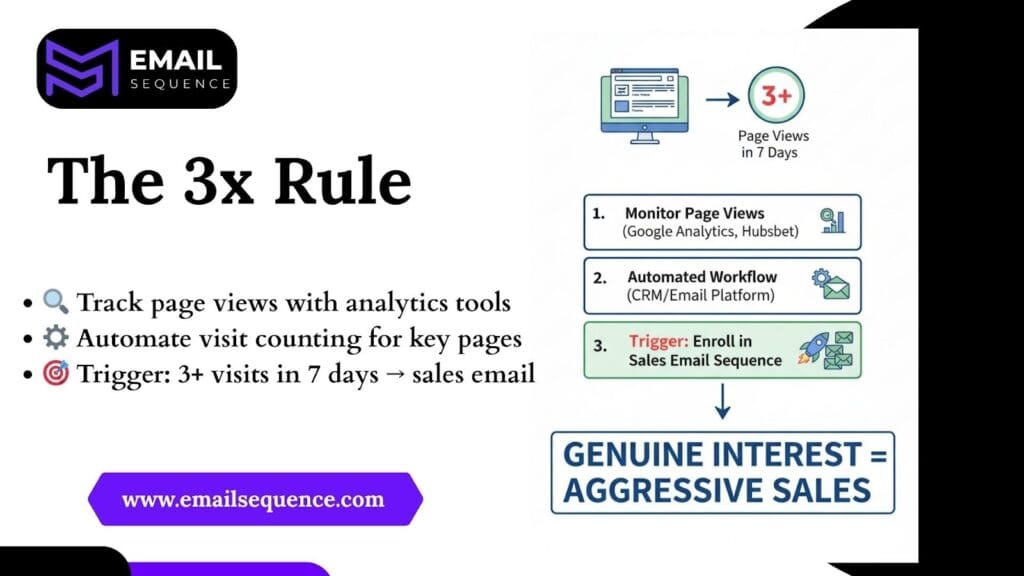
Trigger a sales-oriented sequence only when a user views a high-value page (such as the Pricing page, a specific Case Study, or the Features page) 3 or more times within 7 days. This signals genuine interest and justifies a more aggressive sales approach.
- How to do it: Use website tracking tools (like Google Analytics, HubSpot, or a customer data platform) to monitor page views for individual users.
- Set up an automated workflow: Create a rule in your email marketing or CRM platform that counts visits to specific URLs from the same user.
- Define the trigger: If the count reaches “3 or more” within a 7-day window, automatically enroll that contact into a pre-written, sales-focused email sequence.
The “Product Affinity” Sequence:
When a user clicks on a link for the same product category in three different newsletters, you can start sending them content specific to that interest. For example, if someone keeps clicking on links about marketing automation, you can send them case studies, tutorials, and special offers for that feature.
These triggers allow you to move beyond generic messaging and deliver hyper-relevant content that aligns with demonstrated interest.
B. Friction and Failure Triggers (High-Value Retention)
Some of the most valuable triggers occur when something goes wrong. These moments represent critical intervention points where a well-timed email can save a customer relationship.
Failed Payment Recovery:
Payment failures are more common than many businesses think, and they silently hurt your revenue. When a payment fails, immediately send a personalized, short email sequence. This sequence should:
- Provide complete instructions on how to update payment information.
- Include a direct link to the billing page.
- Offer support if they need help.
Unfinished Onboarding / Feature Dropout:
If a user signs up for a trial but fails to log in, complete their profile, or use the core “AHA Moment” feature within 48 hours, trigger a re-engagement sequence. This sequence should focus on education, not sales.
Highlight the specific feature they have not used, explain its value, and provide a step-by-step guide to getting started.
These triggers do not just recover revenue; they demonstrate that you are paying attention and that you care about the customer’s success.
Testing & Optimization for Behavioral Flows
Building a Behavioral Engine is not a “set it and forget it” process. The most successful email marketers continuously test and optimize their sequences to maximize performance. However, testing flows based on behavioral triggers is fundamentally different from testing broadcast emails. Here is how to do it correctly.
A. Testing the Delay (Timing Incrementality)
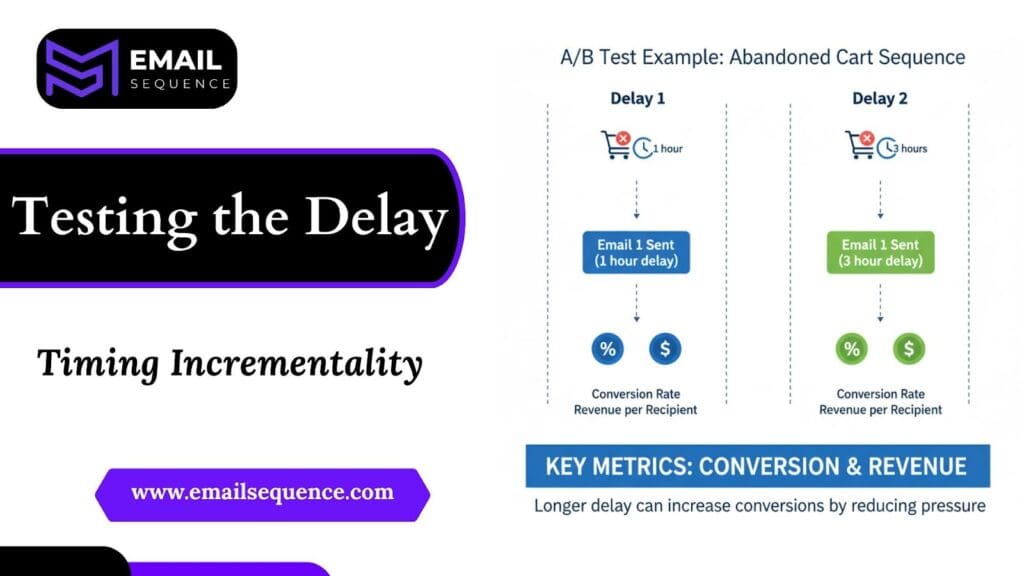
The most impactful A/B test you can run is not about copy or subject lines—it is about timing. The delay between a trigger event and the first email in a sequence can dramatically affect conversion rates.
Test Example: For an Abandoned Cart sequence, test the following delays:
- Delay 1: Send the first email 1 hour after cart abandonment.
- Delay 2: Send the first email 3 hours after cart abandonment.
Track the following metrics for each delay:
- Conversion Rate: What percentage of users complete their purchase after receiving the email?
- Revenue per Recipient: What is the average revenue generated per email sent?
Do not rely solely on open rates or click-through rates. The only metrics that matter are conversion and revenue. In many cases, a slightly longer delay allows the user more time to decide without feeling pressured, resulting in higher conversion rates.
B. The Sequence Length A/B Test
How long should a behavioral sequence be? The answer depends on the goal of the sequence and the stage of the customer journey.
Test Example: For a Re-Engagement sequence, test the effectiveness of:
- Short, High-Urgency Sequence: 2 emails sent over 7 days, with strong urgency messaging and a limited-time offer.
- Long, Nurturing Sequence: 5 emails sent over 30 days, with educational content, case studies, and a softer call to action.
Track the Win-Back Rate (the percentage of dormant users who re-engage) and the Revenue per Sequence to determine which approach delivers better long-term value.
C. Beyond Open Rate: Focus on Conversion Rate and Revenue per Email Sent
Open rates and click-through rates are vanity metrics. They tell you that people saw your email and clicked a link, but they do not tell you whether that email generated revenue.
For behavioral triggers, the only metrics that matter are:
- Conversion Rate: The percentage of recipients who complete the desired action (e.g., purchase, sign-up, feature adoption).
- Revenue per Email Sent: The total revenue generated divided by the number of emails sent.
These metrics provide a clear picture of ROI and allow you to make data-driven decisions about which sequences to scale and which to refine.
Unlock Revenue with Sophisticated Automation
The businesses that thrive in the modern email landscape are those that have moved beyond basic automation and have built systems that react intelligently to user behavior.
To build your own Behavioral Engine, you must:
- Implement Prioritization: Define a clear hierarchy of triggers to prevent conflicts and ensure the highest-value emails always win.
- Leverage High-Intent Triggers: Use advanced triggers like the 3x Rule and Product Affinity sequences to engage hot leads at the right moment.
- Test the Sequence Logic: Optimize timing delays and sequence length to maximize conversion rates and revenue.
Final Thoughts
The days of sending generic, scheduled emails are finished. We must build a smart Behavioral Engine for sales. This powerful system turns every single customer action, from browsing a page to a failed payment, into a strategic opportunity.
You learned why setting clear Trigger Prioritization rules stops emails from conflicting and saw how to use high-value behavioral triggers like the 3x Rule to find your hottest leads. Most importantly, you discovered that testing your sequence timing and focusing on real metrics like conversion and LTV drives huge results.
To handle this level of precise automation, you need a powerful tool. EmailSequence gives you the smart logic, clear controls, and testing features you require. Stop letting old strategies hold you back. Visit EmailSequence.com to start building your Behavioral Engine.
Frequently Asked Questions
What are behavioral triggers in email marketing?
Behavioral triggers are automated email actions that respond to user behavior, like purchases, page visits, or cart abandonment. Instead of sending scheduled emails, you send messages based on what the user actually does, making communication more relevant and timely.
What is trigger prioritization, and why is it important?
Trigger prioritization defines which email should be sent first when multiple triggers fire simultaneously. For example, a purchase confirmation should override an abandoned cart email. Prioritizing prevents overlap, avoids confusion, and ensures the right message reaches users at the right time.
What is the “Exit Condition” and why is it critical?
The Exit Condition stops an email sequence the moment a user completes the goal the sequence targets (e.g., a purchase or profile completion). You must define and implement this rule to immediately pull the user out of the flow, ensuring they never receive an irrelevant or annoying follow-up email.
How can I stop my automation from feeling spammy?
Apply a smart frequency cap. Limit triggered emails to one per day, and only break the rule for essential transactions like order or password updates.
