
Email Content Integration: 5 Strategies for SEO & Growth
Picture this: Your inbox is overflowing, leads are pouring in from webinars, website signups keep climbing, but the energy drains from your team as hours slip away on manual data entry. Have you ever wondered how much growth your business loses to these hidden silos?
If your answer is “too much,” you are not alone.
For marketing managers and CRM experts chasing scalable results, the real game changer is email content integration. This advanced approach lets you erase manual headaches, automate your email campaigns, and deliver highly personalized messages in real time.
With the right integration, you connect your ESP directly to live data, transforming scattered information into a seamless, unified marketing powerhouse. As 2025 approaches, failing to prioritize email content integration means falling behind. This guide reveals how you can stay ahead, boost your ROI, and unlock marketing automation that works for your entire business.
The Core Mechanics: Features, Requirements, and How Integration Works
Understanding the mechanics of integration removes the fear of the unknown. It is not magic; it is simply plumbing for your data.
Foundational Features and Requirements for Integration
To build a robust system, you need the right tools.
- The Platform/Tool: You cannot do this manually. You need an email integration platform (like an iPaaS) or robust email marketing software that supports native connections.
- API Access: Your systems must talk to each other. This requires open, well-documented Email APIs. These allow for deep synchronization of customer data.
- Data Mapping: This is the translation layer. You must map fields correctly. For instance, the “First Name” field in your CRM must match the “F_Name” field in your email platform.
- Automated Workflows: The true power lies in automation. You need the ability to trigger email sequences based on external events, such as purchases or lead replies.
How Integration Works: The 3 Core Mechanisms
You have three main paths to achieve integration.
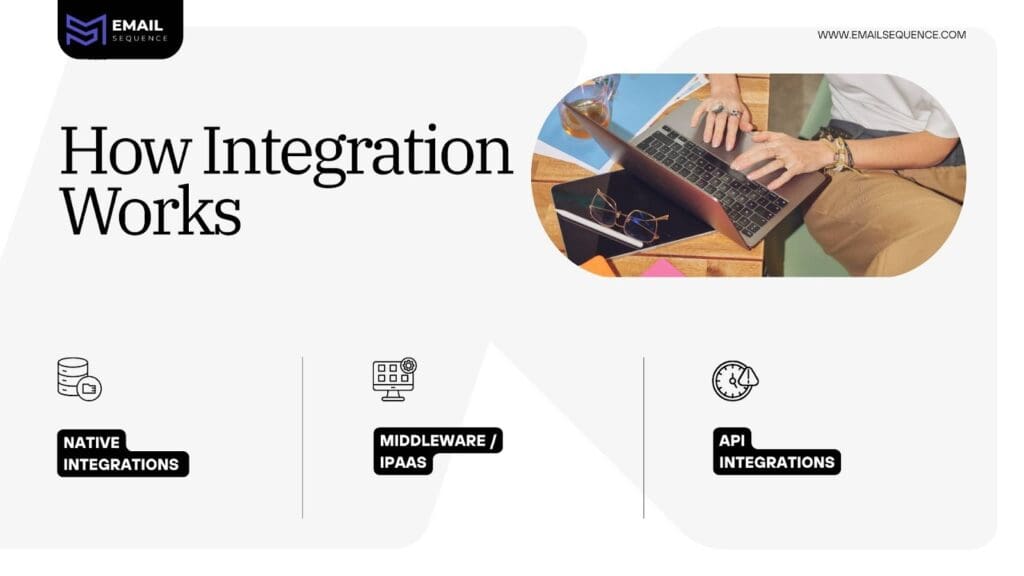
- Native Integrations (Out-of-the-Box): This is the simplest path. Think HubSpot connecting directly to Gmail. Tip: Use this for core, high-volume tasks where simplicity is key.
- Middleware / iPaaS (Zapier, Make): These tools act as a flexible middleman. They connect apps that do not natively talk to each other. Tip: This is ideal for custom, low-volume automation logic.
- API Integrations (Custom Code): This offers maximum flexibility. Developers use coding skills to build bespoke data flows. Tip: This is necessary for complex, real-time content rendering.
The Strategic Imperative: Why Integration is Crucial for Business Growth
Why bother with the technical setup? Because isolated data costs you money.
Why Email Content Integration is Important
The core problem is data silos. When customer data is trapped in one system, your marketing becomes fragmented. You send welcome messages to people who have already bought the product. You send discount codes to loyal customers who just paid full price.
Integration solves this. It ensures a consistent customer experience, also known as unified marketing. It allows you to track customer interactions across every touchpoint.
High-Level Benefits:
- Improve Customer Experience
- Reduce Context Switching for your team
- Optimize Resources
- Achieve Personalization at Scale
What Does an Email Content Integration Look Like?
Imagine a seamless flow. A customer buys a pair of running shoes on your e-commerce platform. Their purchase history updates instantly in the CRM. This data point triggers the email marketing software to send a personalized email suggesting matching running socks. No human lifted a finger. The data flowed effortlessly, and the customer satisfaction score went up.
Requirements Checklist: Ensuring Integration Success
Before you start, ensure you have these elements in place.
| Element | Description | Why It Is Necessary |
| API Keys/Webhooks | Essential credentials for data exchange. | Allows programmatic, real-time data sync. |
| Clean Data Schema | Defined fields are mapped across all systems. | Prevents duplicate contacts and field mapping errors. |
| Content Pillars | Defining which systems supply content data. | Ensures integrated marketing and relevant content. |
| Deliverability Setup | SPF/DKIM/DMARC configuration. | Guarantees high email deliverability and keeps you out of the spam folder. |
The 5 Top Secret Strategies to Master Dynamic Content and SEO Synergy
Most marketers stop at basic synchronization. To truly dominate, you need to use these advanced strategies.
Open-Time Conditional Content
Stop using basic merge tags. True dynamic content happens at the moment of open.
Concept: You use external API calls to render content when the user opens the email, not when you send it. This could be current inventory stock, live pricing, or a countdown timer.
Improvement: This eliminates the risk of sending users to out-of-stock products. It ensures relevant details are always accurate, drastically boosting conversion rates.
Webhook-Driven Engagement Velocity Mapping
Speed matters in sales.
Concept: Instead of waiting for an API to poll for data every hour, use real-time Webhooks. Push key engagement signals, like a reply or a bounce, back into your CRM immediately.
Improvement: This triggers immediate follow-up emails from sales or flags bounced contacts instantly. It improves contact hygiene and accelerates the sales cycle.
Dynamic Content Pillars for SEO Synergy
Your email content should not live in a vacuum. It should feed your SEO strategy.
Content Focus:
- Pillar 1 (CRM/CDP): Connects for Customer Context. This includes loyalty tier and segment data.
- Pillar 2 (CMS): Connects for Content Delivery. Fetch the latest articles dynamically.
- Pillar 3 (E-commerce): Connects for Real-Time Triggers. Use this for abandoned carts and product recommendations.
Strategy: By dynamically pulling in archived blog content, you ensure your email campaigns are always up to date. This drives high-quality traffic to your site, boosting user signals that search engines love.
The ‘Cliffhanger’ Content Amplification
Do not give everything away in the email.
Strategy: Structure your email marketing campaigns to raise a high-intent question. Provide value, but leave the solution on your website. This is content amplification in action.
Improvement: Users click through with high intent to find the answer. This improves dwell time on your site, which is a critical SEO signal.
Auditing for Compliance and Data Inconsistency
Trust is hard to gain and easy to lose.
Strategy: Use your integration platform’s logs to perform weekly audits. Check for API token expiration and field mapping inconsistencies.
Improvement: This proactive approach prevents data synchronization delays. It ensures you sync data correctly and maintain client trust.
Business Impact: Uses and 7 Tangible Benefits
Integration transforms operations. Here is how it impacts the bottom line.
Understanding Your Business Improvement Through Integration
- SaaS & Sales: Streamline the sales cycle. By integrating In-App Email with your CRM, every email is automatically recorded.
- KPI Impact: Shorter sales cycles (e.g., 30% faster).
- E-commerce: Drive repeat purchases. Use transactional emails triggered by store data to suggest complementary items.
- KPI Impact: Increased repeat purchase rate (e.g., 20% jump).
- HelpDesk: Improve response times. Connect your email to your ticketing system.
- KPI Impact: Faster response time (e.g., 40% improvement).
7 Benefits of Implementing Email Content Integration Strategies
- Dual Traffic Source: You gain traffic from email subscribers and new organic visitors via archived content.
- Evergreen Asset Creation: Your content works long after the send date.
- Revenue Generation: You see higher ROI from cart abandonment and cross-sell emails.
- Operational Efficiency: You eliminate manual data copying. This saves marketing teams 10-15+ hours per week.
- Data Integrity: All systems share a single source of truth for customer status.
- SEO Authority: High-intent clicks from emails send strong user-behavior signals to search engines.
- Future-Proofing: It positions the company for advanced AI-driven personalized marketing.
Implementation, Pitfalls, and Conclusion
Ready to start? Follow this roadmap.
The 6-Step Implementation Roadmap
Optimization ensures you get the maximum return on your investment. Do not settle for basic syncs.
- Define Goals: What key metrics do you want to improve?
- Gather Credentials: Collect API keys for all the tools.
- Locate Options: Choose your integration platform.
- Authenticate and Configure: Connect your accounts.
- Test Rigorously: Check for data accuracy. Ensure signup forms populate the right lists.
- Monitor and Optimize: Use reporting tools and performance metrics to refine the process.
Common Pitfalls and Fixes
- Duplicate Contacts: This ruins your database. Fix: Adjust settings to match on a unique key, like an email address, instead of creating new records.
- Authentication Token Expired: The sync stops working. Fix: Re-authenticate promptly or check if the provider supports refresh tokens.
- Hitting Rate Limits: You are sending too much data too fast. Fix: Implement retries with exponential backoff.
Conclusion: The Final Step to a Unified Customer Experience
Email content integration is the only path to scale, personalization, and efficiency. It allows you to track customer interactions, manage multiple accounts, and provide valuable insights to your team. Whether you are using pre-designed templates or custom code, the goal is the same: a unified, seamless experience for your customer.
Do not let your data sit in silos. Start integrating today. Download our “Grab-and-Go Email Integration Checklist” to guide your first setup and unlock the full potential of your marketing stack with an email sequence.
Frequently Asked Question
What is email content integration?
Email content integration connects email platforms with data sources like CRMs, CMSs, or e-commerce systems to enable personalized, dynamic, and automated email campaigns.
Why is email content integration important?
It eliminates data silos, improves customer engagement, enhances personalization, and streamlines workflows, leading to higher ROI and better marketing efficiency.
What tools are needed for email content integration?
You need an email integration platform (e.g., iPaaS), email marketing software, and access to APIs or webhooks for seamless data synchronization.
How does email content integration improve SEO?
By driving high-intent traffic from emails to your website, it boosts dwell time, click-through rates, and user engagement—key SEO signals.
What are the benefits of dynamic email content?
Dynamic content ensures real-time personalization, reduces stale offers, and increases conversion rates by delivering relevant details at the moment of email open.
