
Email Footer Design: Best Practices & Legal Requirements
Effective email footer design is more than a set of links at the bottom of your message—it is a critical mix of legal compliance, brand credibility, and user experience. This guide explains what to include, where to place it, and how to design a footer that meets legal requirements while enhancing engagement.
Marketers often overlook email footers, but they’re key to building trust and maintaining sender reputation. A well-crafted footer reinforces your brand, complies with GDPR and CAN-SPAM, and avoids triggering spam filters or fines.
By mastering these footer elements, you protect your business and provide a transparent, professional experience for your audience. Whether you are sending a weekly newsletter or a transactional receipt, understanding the nuances of legal disclaimers and layout is essential for long-term success.
Legal Requirements Every Email Footer Must Satisfy
Most lists lack legal context and global nuance, leaving businesses vulnerable to compliance issues. Understanding the specific regulations that apply to your audience is the first step in creating a safe and professional email strategy.
CAN-SPAM Act (USA)
The CAN-SPAM Act sets the rules for commercial email in the United States and establishes requirements for commercial messages. Violating these rules can result in penalties of up to $50,120 per email.
- Physical Address: You must include a valid physical postal address. This can be your current street address, a post office box you have registered with the U.S. Postal Service, or a private mailbox you have registered with a commercial mail receiving agency established under Postal Service regulations.
- Opt-out Mechanism: Your email must include a clear and conspicuous explanation of how the recipient can opt out of getting email from you in the future.
- Prompt Honor of Requests: You must honor a recipient’s opt-out request within 10 business days.
CASL (Canada)
Canada’s Anti-Spam Legislation (CASL) is one of the toughest in the world, requiring explicit consent before sending commercial electronic messages (CEMs).
- Identification: The footer must clearly identify the person or organization sending the message, as well as the person on whose behalf the message is sent, if different.
- Contact Information: You must provide information that enables the recipient to readily contact you, such as a mailing address and a telephone number, email address, or website URL.
- Unsubscribe Mechanism: The unsubscribe link must be functional for at least 60 days, and you must process unsubscribe requests without delay, and in any event within 10 business days.
GDPR (EU)
The General Data Protection Regulation (GDPR) affects how you handle the personal data of EU citizens, emphasizing transparency and user control.
- Right to Withdraw Consent: The footer must make it as easy to withdraw consent as it was to give it. This usually means a clear and accessible unsubscribe link.
- Transparency: While not always strictly in the footer, linking to your privacy policy from the footer is best practice to explain how you process subscriber data.
- Data Controller Identity: You should clearly state who is collecting the data (the data controller), often achieved through clear branding and contact details.
Other Regions (UK, Australia, etc.)
Different countries have their own specific requirements that may overlap with or differ from major regulations like GDPR.
- United Kingdom: Following Brexit, the UK GDPR mirrors the EU GDPR but is a separate regime. The Privacy and Electronic Communications Regulations (PECR) also sit alongside the UK GDPR to regulate electronic marketing.
- Australia: The Spam Act 2003 prohibits sending unsolicited commercial electronic messages. It requires accurate sender information and a functional unsubscribe facility.
Core Footer Elements: What Every Email Needs
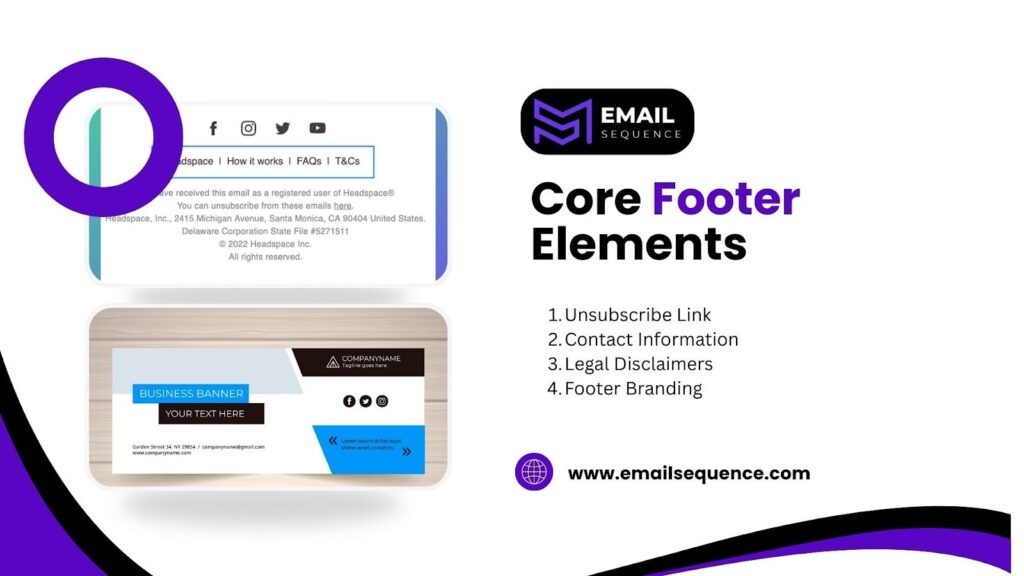
This section outlines the non-negotiable components that ensure your emails are both legal and user-friendly. Each subsection explains why these specific items matter for your email footer design.
Unsubscribe Link
Unsubscribe placement is crucial; burying this link frustrates users and increases the likelihood they will mark your email as spam. Making it easy to leave actually builds trust and improves list hygiene.
- Visibility: Place the link clearly at the bottom where users expect to find it. Do not use a font size or color that blends into the background.
- Clear Wording: Use straightforward language like “Unsubscribe” or “Manage Preferences.” Ambiguous phrases can confuse users and violate compliance rules.
- One-Click Process: Ideally, the link should lead directly to a confirmation page or a preference center, not a login screen or a complex survey.
Contact Information
Providing clarity to verify your business identity and explore your offerings further easily proves you are a legitimate entity and offers a channel for support.
- Physical Address: As mentioned in the legal section, a physical address is often a legal requirement. It provides transparency about your business location.
- Support Channels: Including a link to your support team or a general “reply-to” instruction helps users resolve issues without resorting to spam complaints.
- Website Link: A direct link to your homepage lets users easily verify your business identity and explore your offerings further.
Legal Disclaimers
Allow users to quickly verify your business identity and learn more about your offerings. This helps set clear expectations around privacy and liability.
- Privacy Policy Link: A direct link to your privacy policy is essential for GDPR compliance and general transparency regarding data usage.
- Copyright Notice: A simple copyright line (e.g., “© 2024 Company Name. All rights reserved.”) asserts ownership over your content.
- Industry-Specific Disclaimers: Financial, medical, or legal industries may require specific disclosure statements regarding the nature of the advice or services provided.
Footer Branding
Branding in the footer reinforces visual continuity and ensures the recipient knows exactly who is sending the message, even if they scroll to the bottom immediately.
- Logo: A small version of your logo reinforces brand recognition.
- Tagline: Including your company tagline can serve as a final reminder of your value proposition.
- Consistent Design: The colors and fonts in your footer should match the rest of your email and overall brand guidelines.
Optional But Valuable Footer Elements
Many footers lack valuable info that improves UX, missing an opportunity to deepen engagement. Adding these elements can transform a standard footer into a useful resource hub.
Social Media Linking Icons
Social links extend the relationship beyond the inbox, allowing subscribers to connect with you on platforms where they spend their free time.
- Icon Clarity: Use recognizable icons for platforms like LinkedIn, Twitter, and Instagram rather than text links to save space and improve visual appeal.
- Direct Linking: Ensure each icon links directly to your specific profile page, not the platform’s homepage.
- Visual Balance: Space the icons evenly to ensure they are clickable on mobile devices without accidental taps.
Preference Center Link
A preference center reduces unsubscribes by giving users an alternative to leaving your list entirely. It puts the subscriber in control of the frequency and content they receive.
- Frequency Options: Allow users to choose how often they hear from you (e.g., weekly vs. monthly).
- Content Interests: Let subscribers select specific topics they are interested in, ensuring they only receive relevant content.
- Update Profile: Provide a way for users to update their email address or other personal details without having to re-subscribe.
Legal Policy Shortcuts
Beyond the privacy policy, linking to other key documents in your email footer design can prevent customer service queries and provide clarity on your operations.
- Terms and Conditions: Essential for e-commerce or SaaS businesses to define the rules of service usage.
- Return Policy: For retail businesses, a quick link to return information can be very helpful for customers reviewing recent order emails.
- Security Information: If you handle sensitive data, a link to your security practices builds confidence.
Support Links
Including direct paths to help resources can deflect tickets and improve customer satisfaction.
- FAQ Page: Link to your most frequently asked questions to help users solve common problems instantly.
- Help Desk: A direct link to your ticketing system or help center makes it easy for users to find formal support.
- Community Forums: If you have a user community, linking to it can encourage peer-to-peer support and engagement.
Best Practices for Email Footer Design
Competitor content is often weak here; use this layout guidance to ensure your footer is functional and accessible. Good email footer design balances aesthetics with utility.
Information Hierarchy
Organizing information logically ensures that the most critical actions are the easiest to find.
- Priority Placement: Place the unsubscribe link and physical address in a prominent position, as these are legal necessities.
- Grouping: Group similar links together (e.g., legal links in one cluster, social links in another) to make the footer scannable.
- Visual Separation: Use spacing or dividers to separate the footer from the main body content, signalling the end of the message.
Readability & Font Choices
If your footer is illegible, it fails its primary purpose of providing information and compliance.
- Font Size: Keep text small to distinguish it from the body, but ensure it is at least 10px to 12px for readability.
- Font Style: Stick to standard, web-safe fonts. Avoid decorative scripts that are hard to read at small sizes.
- Color Choice: Ensure the text color contrasts sufficiently with the background color (e.g., dark grey on white, or white on dark grey).
Color Contrast & Accessibility
Accessibility ensures all recipients, including those with visual impairments, can interact with your footer.
- Contrast Ratios: Adhere to WCAG guidelines for contrast ratios between text and background colors.
- Link Identification: Ensure links look clickable, perhaps by underlining them or using a distinct color.
- Alt Text: If you use image-based icons for social media, always include descriptive ALT text for screen readers.
Mobile-Friendly Formatting
With substantial email opens occurring on mobile devices, your footer must adapt to smaller screens.
- Touch Targets: Ensure links and buttons have enough padding (at least 44×44 pixels) so they can be easily tapped with a thumb.
- Stacking: On mobile, multi-column footers should stack vertically to prevent horizontal scrolling or tiny text.
- Left Alignment: Left-aligned text is generally easier to read on mobile devices than centered text, especially for longer legal disclaimers.
Placement & Formatting Guidelines
This section merges design with compliance, clarifying exactly how to position footer elements for maximum effectiveness.
- Bottom Placement: The footer should invariably sit at the very bottom of the email, below the signature and any postscripts (P.S.). This is the universal standard users expect.
- Visual Distinction: Use a background color slightly different from the email body (e.g., a light grey) to visually separate the footer area.
- Padding and Margins: Include sufficient white space around the text blocks so the footer does not look cluttered or intimidating.
Examples: Good vs Bad Email Footers
Analyzing practical examples helps visualize how these principles come together in real-world scenarios.
Example: Minimal Compliant Footer
A minimal footer focuses strictly on legal requirements and essential functions.
- Components: Includes a clear Unsubscribe link, the physical business address, and a link to contact support.
- Why it works: It is clean, distraction-free, and meets all legal obligations without clutter. It is ideal for transactional emails where the focus is on the receipt or notification.
Example: Enhanced UX Footer
An enhanced footer adds value through navigation and brand building.
- Components: Includes Unsubscribe, Address, social links, a preference center link, and a short privacy snippet.
- Why it works: It empowers the user to connect further and manage their experience, turning the footer into a retention tool. This style suits marketing newsletters well.
Example: Poor Footer
A poor footer ignores design principles and compliance risks.
- Components: Missing unsubscribe link (or hidden), no contact info, tiny, illegible font, packed links without spacing.
- Why it fails: This design is a compliance liability and frustrates users, likely leading to spam reports. It damages brand reputation.
How a Strong Footer Improves Email Deliverability
This is often overlooked, but your email footer plays a direct role in whether your emails land in the inbox or the spam folder. A well-crafted footer not only builds trust with your audience but also signals to email providers that your content is legitimate.
- Trust Signals: ISPs scan footers for physical addresses and unsubscribe links. Their presence signals a legitimate sender.
- Engagement: A clear unsubscribe link prevents users from hitting the “Report Spam” button, which is the single most damaging action for your sender reputation.
- Consistency: Consistent footer information across all your email campaigns helps ISPs recognize and validate your sending history.
- Compliance: Including essential details like a physical address and unsubscribe link ensures compliance with email regulations such as CAN-SPAM and GDPR, protecting your business from legal risks.
- Professionalism: A well-designed footer adds credibility to your emails, reinforcing your brand identity and building trust with your recipients.
Conclusion
Designing an email footer is a careful balance between legal compliance and user experience. It’s more than just a space for fine print; it’s a tool to strengthen subscriber relationships while ensuring your business stays compliant. Focus on essentials like clear contact info and an easy unsubscribe link to create respectful, professional emails.
Email footer design isn’t static. Laws change, and user behaviors shift, so regularly audit your footers. Ensure legal disclaimers are current and social links work. A well-designed footer enhances deliverability, builds trust, and fosters a more engaged email list.
Prioritize transparency and usability, and your footer will become a strong foundation for your entire email marketing strategy. Ready to design email footers that build trust and drive conversions? Visit emailsequence.com to learn how to create a sequence that succeeds.
Frequently Asked Questions
What should an email footer include?
An email footer must include a physical mailing address and an unsubscribe link to meet legal standards. Ideally, it should also contain a link to your privacy policy and contact information.
Why is footer design important?
Footer design is crucial for legal compliance, user trust, and deliverability. A good design ensures users can find essential information and manage their preferences easily.
Is an unsubscribe link mandatory?
Yes, for commercial emails, an unsubscribe link is mandatory under laws like CAN-SPAM, CASL, and GDPR.
Can I use icons instead of text links?
Yes, you can use icons for social media or contact methods, provided they are recognizable and include ALT text for accessibility.
