
Email Header Optimization: Boost Open Rates & Engagement
Your email open rate is often determined before the recipient even reads a single word of your content. In the crowded digital space of a modern inbox, users make split-second decisions based on micro-interactions with three key elements: the sender identity, the subject line, and the preview text.
Collectively, these elements form the core of email header optimization, a critical practice that ensures your message stands out amidst the noise.
Email header optimization refers to the strategic refinement of all visible elements in the inbox preview to maximize engagement. It goes beyond writing a catchy title; it involves creating a cohesive inbox appearance that signals trust, relevance, and value immediately.
When executed correctly, optimization transforms a standard email into an unmissable opportunity for your audience.
What Is Email Header Optimization?
Email header optimization is the process of fine-tuning the specific components of an email that a recipient sees before opening the message. It is the digital equivalent of a first impression. If this impression fails to resonate, the quality of the content inside the email becomes irrelevant because the user never sees it.
The primary components included in optimization are:
- From Name: The displayed name of the sender.
- Subject Line: The main headline of the email.
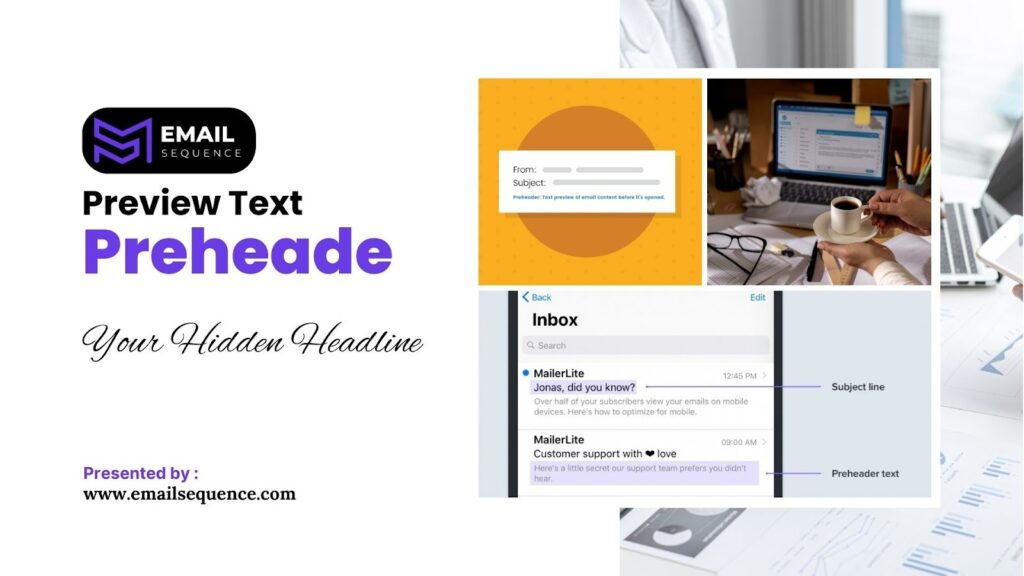
- Preview Text: The snippet of text displayed next to or below the subject line.
- Reply-to Identity: A secondary trust signal indicating where a response will go.
These elements work in tandem to influence deliverability and open rates. A visual mock-up of an optimized inbox appearance would show a recognizable name, a compelling subject line that fits within the character limit, and preview text that contextualizes the offer without cutting off mid-sentence.
Sender Identity: Building Trust with Your “From” Name
Why does the name attached to an email matter so much to the recipient? It is the primary indicator of whether the message is safe, relevant, and worth their time.
The sender identity acts as a powerful trust signal that can either validate your brand authority or trigger a deletion. Best practices suggest that consistency and human connection yield the best results:
- Real person vs brand name: Testing often shows that emails from a specific person (e.g., “John Smith”) perform better than generic company names, as they feel more personal.
- Combining name + brand: A hybrid approach, such as “Sara from EmailSequence,” balances personal connection with immediate brand recognition.
- Consistency vs freshness: While maintaining a consistent identity builds habit, refreshing the sender name for special campaigns can renew interest.
- Personalization considerations: Ensure the chosen identity aligns with the tone of the content; a newsletter feels right coming from a person, while a transactional receipt should come from the brand.
Subject Line Optimization | The Core of Header Performance
The subject line is the most scrutinized element of your email header. It must promise value and spark curiosity without resorting to deception.
Subject Line Formula That Works
How do you craft a subject line that compels a user to click without hesitation? You must leverage a reliable subject line formula that balances emotional triggers with clear benefits.
Effective subject lines often rely on urgency, curiosity, or a direct promise of value. However, clarity should always supersede cleverness. A reader should never have to guess what the email contains.
Consider these proven formula examples:
- BENEFIT + TIMELY + PERSONALIZATION: “John, save 20% on your strategy audit today.”
- Question + Urgency: “Are you missing this SEO step? Expires tonight.”
- Numbers + Curiosity: “7 ways to double your leads (Strategy #3 is new).”
Anatomy of High-Performing Subject Lines
What specific elements separate a high-performing subject line from one that gets ignored? The anatomy of a winning headline typically includes precise triggers that catch the eye.
Use these components to construct your headlines:
- Personalization tokens: Using the recipient’s name or company name can increase open rates significantly.
- Numbers and stats: Digits stand out in a wall of text and promise a specific, digestible amount of information.
- Emojis: When used sparingly, emojis add visual flair and can convey emotion quickly.
- Verbs and action words: Start with strong verbs to inspire immediate action.
- Avoiding spam triggers: Steer clear of words like “Free,” “Guarantee,” or excessive capitalization, which trigger spam filters.
| Do This | Do Not Do This |
| Use specific numbers (e.g., “5 tips”) | Use vague promises (e.g., “Some tips”) |
| Keep it under 50 characters | Write long, cut-off sentences |
| Use sentence case | USE ALL CAPS |
| Promise real value | Use bait-and-switch tactics |
Mobile Inbox Constraints & Considerations
Did you know that mobile devices account for a significant portion of all email opens? This reality imposes strict constraints on how much of your subject line is visible.
Mobile screens typically truncate subject lines after 30 to 40 characters. Therefore, you must front-load the most critical words. Ensure the value proposition appears at the very start of the sentence.
- Character truncation: Place the hook within the first 30 characters.
- Front-loading: If the offer is “50% off,” do not bury it at the end of the sentence.
- Visual space: Use emojis or brackets to create visual breaks that draw the eye on small screens.
Preview Text (Preheader) | Your Hidden Headline
The preview text acts as a secondary headline that supports and expands upon the subject line. It provides context that might not fit in the main header. If left blank, email headers often pull default text like “View in browser,” which wastes valuable real estate.
Optimize your preheaders with these strategies:
- Add a secondary benefit: If the subject line creates curiosity, use the preview text to explain the payoff.
- Extend curiosity: Continue the thought started in the subject line to pull the reader further in.
- Avoid filler defaults: Ensure the text is deliberate and not accidental code snippets.
- Examples: Subject: “Your order is ready.” Preview: “Track your shipment and see what is inside.”
Technical Constraints & Email Client Display Differences
It is important to realize that your email will not look the same in every inbox. How do different email clients handle header information?
Desktop clients like Outlook often display more characters than mobile apps like Gmail for Android. Furthermore, dark mode settings can alter how your text and emojis appear. Email header optimization requires you to design for the “lowest common denominator” to ensure legibility across all platforms.
- Desktop vs mobile: Test how headers render on large monitors versus smartphone screens.
- Client differences: Apple Mail typically shows more preview text lines than Gmail.
- Dark mode: Verify that your emojis and text remain visible and impactful against dark backgrounds.
- Line breaks: Strategic line breaks can sometimes force preview text to appear in specific ways on mobile devices.
Inbox Appearance & Psychological Triggers
Why do certain emails trigger an almost automatic desire to click? The answer lies in the psychological cues embedded within the inbox’s appearance.
Humans are wired to respond to specific signals. By incorporating social proof, scarcity, and authority into your headers, you can bypass logical hesitation and appeal directly to emotion.
Leverage these psychological triggers:
- Social proof: Phrases like “Join 10,000 peers” signal that others find value in your content.
- FOMO triggers: Scarcity and urgency (e.g., “Last chance”) create a fear of missing out.
- Authority signals: A consistent, professional sender name builds credibility over time.
- Relevancy signals: Mentioning past behaviors or geographic location proves the email is specifically for them.
- Trust signals: verified logos (BIMI) and consistent branding reduce anxiety about clicking.
Top Header Optimization Mistakes to Avoid
Even experienced marketers fall into traps that damage their reputation. What are the most frequent errors that sabotage email header optimization efforts?
Avoiding these pitfalls preserves your brand integrity and keeps your engagement rates high.
- Using clickbait: Misleading subject lines destroy trust and lead to high unsubscribe rates.
- Over-personalization: Using a name too frequently can feel intrusive and creepy.
- Weak preheaders: Leaving the preview text blank or allowing it to display “unsubscribe” links looks unprofessional.
- Inconsistent identity: Changing the sender name too often confuses recipients.
- Ignoring mobile: Designing only for desktop users alienates the majority of your audience.
Real Examples & Headline Inspiration Bank
Sometimes the best way to learn is to study success. What do optimized headers look like in practice across different industries?
Use these examples as a foundation for your own creativity.
- Headline templates: “[Name], here is your [Resource]”, “How to [Benefit] in [Timeframe]”, “The truth about [Topic]”.
- eCommerce example: Subject: “Your cart is expiring.” Preview: “Save 10% if you complete your purchase now.”
- SaaS example: Subject: “New feature alert: Dashboard 2.0.” Preview: “See your data more clearly than ever.”
- Newsletter example: Subject: “The future of AI marketing.” Preview: “Plus: 3 tools you need to try this week.”
Conclusion
The battle for attention in the inbox is fierce, but you can win it by mastering the micro-interactions that occur before an email is opened. Email header optimization is not a one-time task; it is an ongoing process of refinement and testing.
To get started, follow this simple checklist:
- Audit your current email headers to ensure your sender identity is trustworthy and consistent.
- Implement a subject line formula for your next campaign that focuses on clear benefits and mobile readability.
- Always customize your preview text to support your subject line and drive curiosity.
Systematic testing and iteration are your best tools for growth. By paying attention to these small details, you build a stronger connection with your audience and ensure your valuable content gets the readership it deserves.
Frequently Asked QUestion
What is email header optimization?
Email header optimization involves refining the sender name, subject line, and preview text to maximize the likelihood that a recipient opens the email.
How do I test subject lines?
You test subject lines by creating two distinct variations and sending them to a small percentage of your list. The winner is sent to the remainder of the audience.
Does the sender name impact open rates?
Yes, the sender name is a crucial trust signal. A recognizable and trustworthy name significantly improves open rates.
How long should subject lines be?
Subject lines should ideally be between 6 and 10 words, or roughly 40 to 50 characters, to prevent truncation on mobile devices.
How do preview text and subject line work together?
The subject line grabs attention, while the preview text provides context or a secondary hook to encourage the click.
